Photography Creative Journey
This is where you will find your lessons and help with key photography basics.

Photography Help!
Most useful terms
-
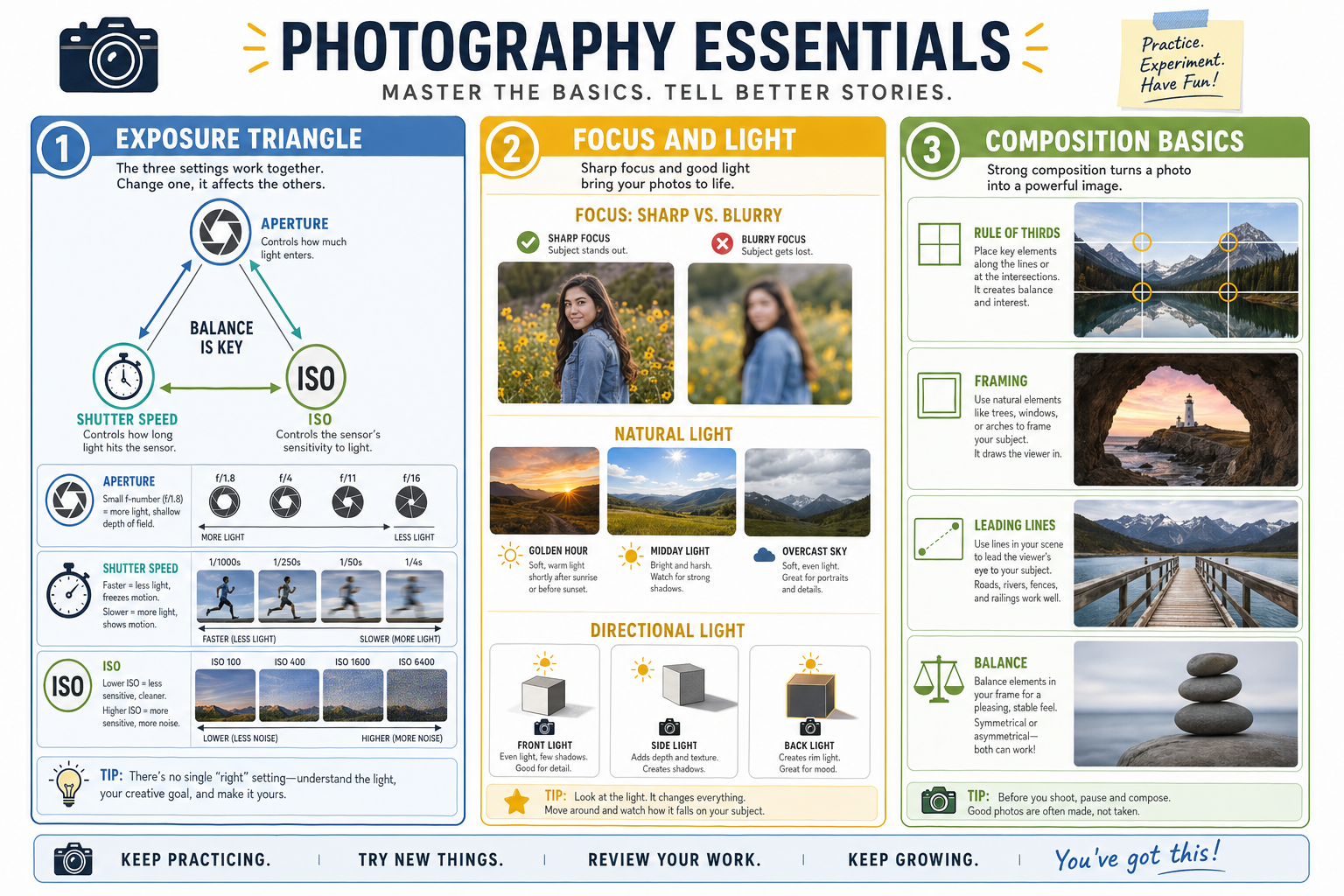
Exposure Triangle: aperture, shutter speed, and ISO work together.
-
Aperture: controls how much light comes in and how blurry the background looks.
-
Shutter Speed: controls how fast or slow motion is captured.
-
ISO: controls how bright the photo is when light is low.
-
Focus: make sure the subject is sharp.
-
Lighting: good light makes a stronger photo.
-
Framing: use doorways, windows, or objects to frame your subject.
-
Composition: place the subject in a strong spot, not always dead center.
-
Balance: keep the photo feeling even and not too crowded.
-
Background: check what is behind your subject before you take the shot.
Camera Basics
Photo Tips
-
Use the best light you can find.
-
Keep your subject in focus.
-
Move your feet to improve the angle.
-
Watch the background.
-
Take more than one photo.
-
Keep it simple.
Schedule (May Change)
Weeks 1–5: Photography Foundations
• Week 1: Intro to Photography – Icebreaker scavenger hunt + favorite photo sharing
• Week 2: Camera Basics – Aperture, shutter speed, ISO (exposure triangle)
• Week 3: Composition & Framing – Rule of thirds, leading lines, angles
• Week 4: Kahoot Review #1 – Foundations recap (camera + composition)
• Week 5: Lighting – Natural vs artificial light + hands-on practice
Weeks 6–10: People & Places
• Week 6: Portrait Photography – Natural light portraits + posing basics
• Week 7: Landscape Photography – Outdoor scenes + depth
• Week 8: Kahoot Review #2 – Portraits & landscapes
• Week 9: Wildlife Photography – Capturing animals or moving subjects
• Week 10: Street Photography – Candid storytelling + emotion
Weeks 11–15: Close-Ups & Objects
• Week 11: Macro Photography – Close-up details + focus practice
• Week 12: Still Life Photography – Creative object arrangements
• Week 13: Kahoot Review #3 – Macro & still life
• Week 14: Product Photography – Ad-style photos + clean backgrounds
• Week 15: Food Photography – Styling and lighting food
Weeks 16–20: Stories & Structures
• Week 16: Editorial Photography – Telling a story through images
• Week 17: Kahoot Review #4 – Product, food, and editorial
• Week 18: Architecture Photography – Buildings, patterns, symmetry
• Week 19: Photojournalism – Capturing real-life moments with meaning
• Week 20: Kahoot Review #5 – Architecture & photojournalism
Weeks 21–25: Creative Experiments
• Week 21: Light Painting – Long exposure with creative light
• Week 22: Abstract Photography – Shapes, colors, textures
• Week 23: Kahoot Review #6 – Light painting & abstract
• Week 24: Event Photography – Simulated event coverage
• Week 25: Sports/Action Photography – Freezing motion vs panning
Weeks 26–30: Portfolio & Showcase
• Week 26: Kahoot Review #7 – Event & action photography
• Week 27: Portfolio Planning – Choosing best work + themes
• Week 28: Editing Basics – Lightroom or free apps
• Week 29: Kahoot Review #8 – Editing & portfolio prep
• Week 30: Showcase & Celebration – Final presentations + feedback