
Kahoot Review + Creative Movie Poster
Ecclesiastes 3:1
“There is an occasion for everything, and a time for every activity under heaven.”
Ecclesiastes 3:1 reminds us that everything has its time and purpose. Just as YAH created different seasons, we can use our creativity to tell stories and communicate ideas.
Today, you will bring together everything you have learned in Photoshop to create something unique!

Part 1: Kahoot Review
Before starting our project, we will play Kahoot to review the Photoshop skills we have learned.
Topics include:
-
Removing and replacing objects
-
Surreal composites
-
Sky replacement
-
Double exposure
-
Glow and neon effects
-
Layers, masks, and blending
Think about how these different tools can work together to create one amazing design.
Part 2: Creative Movie Poster Challenge
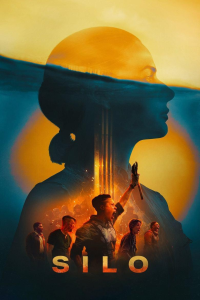 Imagine you are a movie director, and your new movie is about to premiere! Your job is to design a poster that makes people want to watch it.
Step 1: Choose Your Movie Theme
You can create a poster for an imaginary movie about adventure, mystery, fantasy, science fiction, animals, or superheroes.
Your movie must have an original title and story idea.
Step 2: Set Up Your Photoshop Document
-
Open Photoshop and create a new document.
-
Set the dimensions to 2000 × 3000 pixels.
-
Set the resolution to 300 PPI.
-
Choose a background image or color.
Step 3: Design Your Poster
Your poster must include:
-
Movie title: A large, creative title.
-
Main subject: A person, animal, object, or imaginary character.
-
Background: A setting that matches your movie.
-
Photoshop effects: Use at least two techniques we have learned.
-
Movie t
-
agline: A short sentence that makes people curious.
-
Release date: Choose a fictional premiere date.
Step 4: Use Your Photoshop Skills
Try combining at least two of these techniques:
|
Technique |
Creative idea |
|---|---|
|
Surreal composite |
Make a person appear giant |
|
Sky replacement |
Create a dramatic sunset |
|
Double exposure |
Blend a forest into a silhouette |
|
Glow effects |
Add glowing eyes or magical light |
|
Layer masks |
Blend multiple images together |
Homework
Finish your movie poster, submit as a jpg
Answer these questions
-
What is your movie about?
-
What Photoshop techniques did you use?
-
What was the most challenging part of your design?
-
What is your favorite part of your poster?