Design Basics
Brand Style Guide
1 Corinthians 14:40
“But everything must be done decently and in order.”

Your Magazine Needs Its Own Style
You are creating your own magazine, which means you are also the designer responsible for deciding what your magazine will look and feel like.
Think about some of your favorite brands, websites, magazines, or products. They usually have certain colors, fonts, graphics, and styles that they use again and again.
Your magazine needs this same kind of consistency.
This week, you will create a Brand Style Guide for your magazine. This guide will become your visual rulebook as you design future pages.
1 Corinthians 14:40 reminds us:
“But everything must be done decently and in order.”
Creativity doesn't have to mean randomness. You can be creative while still having organization, consistency, and purpose.
What Are the Elements of Design?
The elements of design are the basic visual tools designers use to create their work.
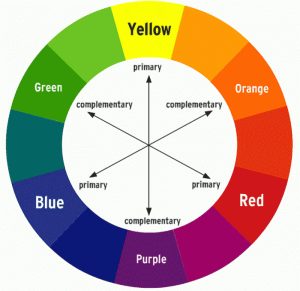
COLOR
Color can help communicate the personality and mood of your magazine.
For example, a sports magazine might use bold, energetic colors while a nature magazine might use earthy or calming colors.
Ask yourself:
- What mood do I want my magazine to have?
- Who is my audience?
- What colors fit my magazine topic?
- Will these colors work together throughout an entire magazine?
TEXT / TYPOGRAPHY
Typography is how you choose and arrange text in your design. Your font choices help create your magazine's personality just like colors and images do.
Choose fonts for:
- Magazine Title/Logo: The font used for your magazine's name
- Headlines: Used for article titles and major headings
- Subheadings: Used to organize sections
- Body Text: Used for paragraphs and articles
- Accent Font: Optional font for quotes, captions, or special features
Try to stick with 2–3 font families throughout your magazine. Too many different fonts can make your design look unorganized.
LINE
Lines can organize information and guide your reader's eyes around the page.
You might use:
- Thick lines
- Thin lines
- Straight lines
- Curved lines
- Dotted lines
- Hand-drawn lines
Your choice should fit the personality of your magazine.
SHAPE
Shapes can be used to organize information or decorate your pages.
Circles, squares, rectangles, triangles, and custom shapes can be used behind text, around photographs, in page backgrounds, or as decorative elements.
TEXTURE
Texture gives your design more visual interest.
Examples include:
- Paper
- Grain
- Fabric
- Paint
- Watercolor
- Chalk
- Wood
- Torn paper
- Brush strokes
Digital designs can create the appearance of texture even though you cannot physically feel it.
Be careful. Too much texture can make a page difficult to read.
SPACE
You don't have to fill every inch of your page!
Empty space, also called white space or negative space, gives your design room to breathe.
Space can help important photographs, headlines, and information stand out.
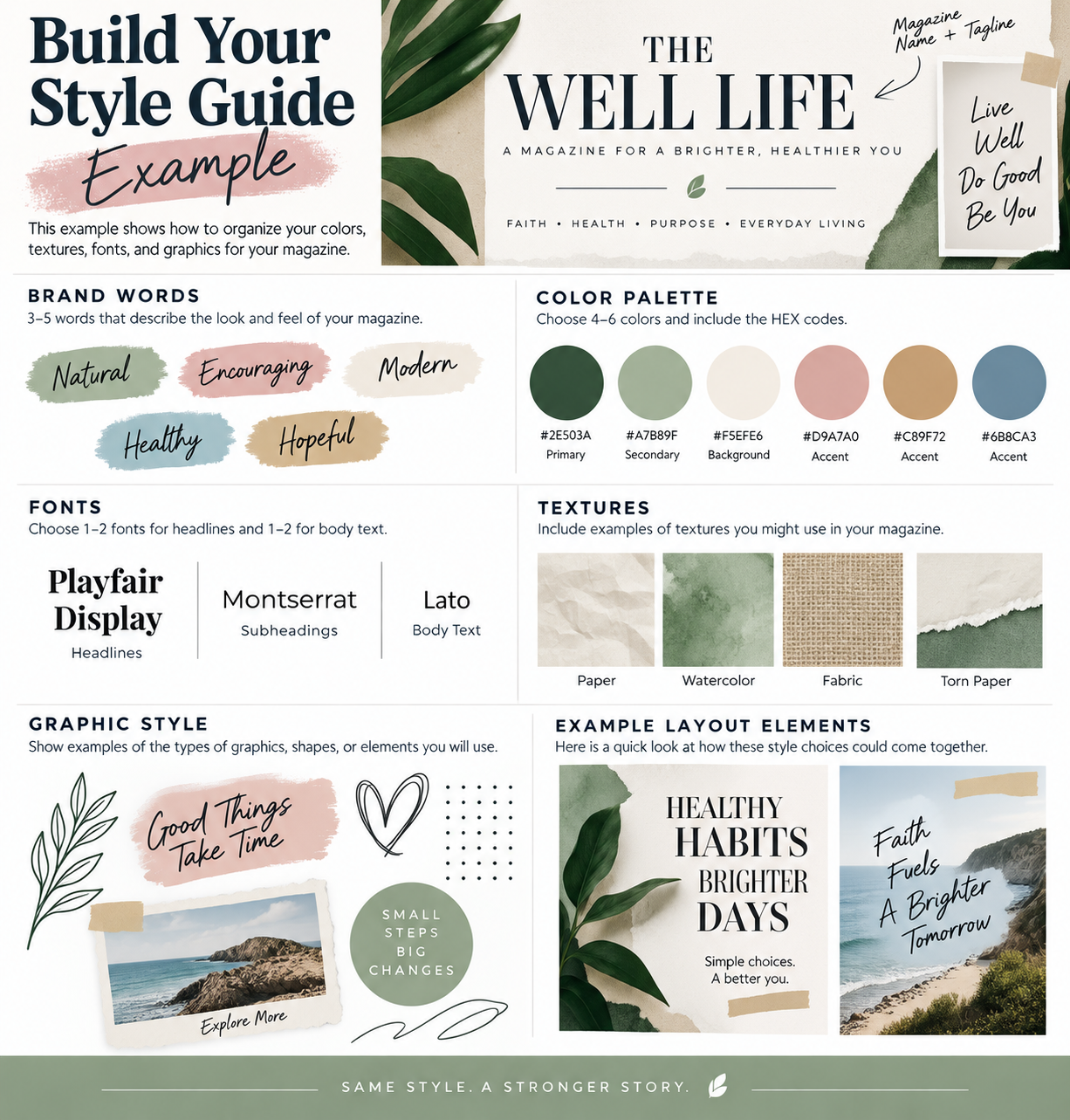
What Is a Brand Style Guide?
A Brand Style Guide is a collection of rules that determines how your magazine should look.
Imagine designing your first page with pastel colors and simple graphics, your second page with neon colors and graffiti, and your third page with elegant gold decorations.
Each page might look interesting by itself, but your magazine wouldn't feel connected.
Your Brand Style Guide helps prevent this.
Your guide will answer:
What colors will I use?
What textures will I use?
What type of graphics will I use?
What should my magazine feel like?
Once you make these decisions, you will use them throughout your magazine.
IN-CLASS MAGAZINE ACTIVITY
Create Your Magazine Brand Style Guide
Today you will create the visual identity for your magazine.
Step 1: Think About Your Magazine
Write down 3–5 words that describe how you want your magazine to feel.
For example:
Bold • Fun • Energetic • Modern
or
Calm • Natural • Clean • Peaceful
or
Creative • Colorful • Playful • Youthful
These words should guide your design decisions.
Step 2: Create Your Color Palette
Choose approximately 4–6 colors for your magazine.
Try choosing:
- 1–2 main colors
- 2–3 supporting colors
- 1 accent color
Record the HEX code for every color.
For example:
Dark Blue: #17365D
Recording the HEX codes means you can use the exact same colors throughout your magazine.
Step 3: Choose Your Textures
Choose 2–3 textures that could work with your magazine.
Think about your topic and audience.
A nature magazine might use paper, leaves, wood, or watercolor textures.
A gaming magazine might use digital, pixel, neon, or technological textures.
A fashion magazine might use fabric, paper, grain, or elegant patterns.
Your textures should support your magazine's personality.
Step 4: Choose Your Graphic Style
Decide what type of graphics will appear throughout your magazine.
You might choose:
- Geometric shapes
- Hand-drawn illustrations
- Doodles
- Brush strokes
- Minimal graphics
- Photo cutouts
- Collage elements
- Decorative lines
- Icons
You don't need to use all of them.
Choose a style that you can repeat throughout your magazine.
Step 5: Build Your Style Guide
Create one Brand Style Guide page that includes:
Magazine Name
3–5 Brand Words
Color Palette + HEX Codes
Texture Examples
Graphic Style Examples
Make your Style Guide look like it belongs to your magazine!
DESIGN CHECK
Look at your Style Guide and ask:
Does everything look like it belongs together?
If your colors say calm and peaceful but your graphics say loud and chaotic, you may need to make some adjustments.
Remember:
Consistency does not mean every page has to look exactly the same.
It means your pages should look like they belong to the same magazine.
Magazine Piece Added This Week
By the end of class, you should have:
BRAND STYLE GUIDE
Keep this guide! You will refer back to it as you design the rest of your magazine.
Homework
Using the ideas and design choices you developed in class, create and submit a completed Brand Style Guide for your magazine.
Your Brand Style Guide should include:
- Magazine Name
- 3–5 Brand Words that describe the look and feeling of your magazine
- Color Palette: Choose 4–6 colors and include the HEX code for each
- Typography: Show the fonts you will use for headlines, subheadings, and body text
- Textures: Include 2–3 textures that fit your magazine's style
- Graphic Style: Include examples of shapes, lines, icons, illustrations, or other graphic elements you plan to use
- Patterns/Backgrounds: Create at least 1 background texture or graphic pattern that could be used in your magazine
Before You Submit
Ask yourself:
Do my colors work well together?
Are my fonts easy to read and appropriate for my magazine?
Do my textures and graphics match my magazine's personality?
Does everything look like it belongs together?
Could I use this Style Guide to help me design the rest of my magazine?
What to Submit
Submit one completed Brand Style Guide that clearly shows the visual direction you will follow when designing your magazine.
This will become your design rulebook for the rest of the magazine project, so make choices you will be able to use consistently on future pages.